Cliptop logoCliptop

Cliptop Changelog

What's new in Cliptop

Full release notes for Cliptop, including clipboard history features, Mac and iOS workflow improvements, bug fixes, and performance updates.

Version 1.5.0macOSiOS

Cliptop 1.5.0: Cliptop for iOS is here

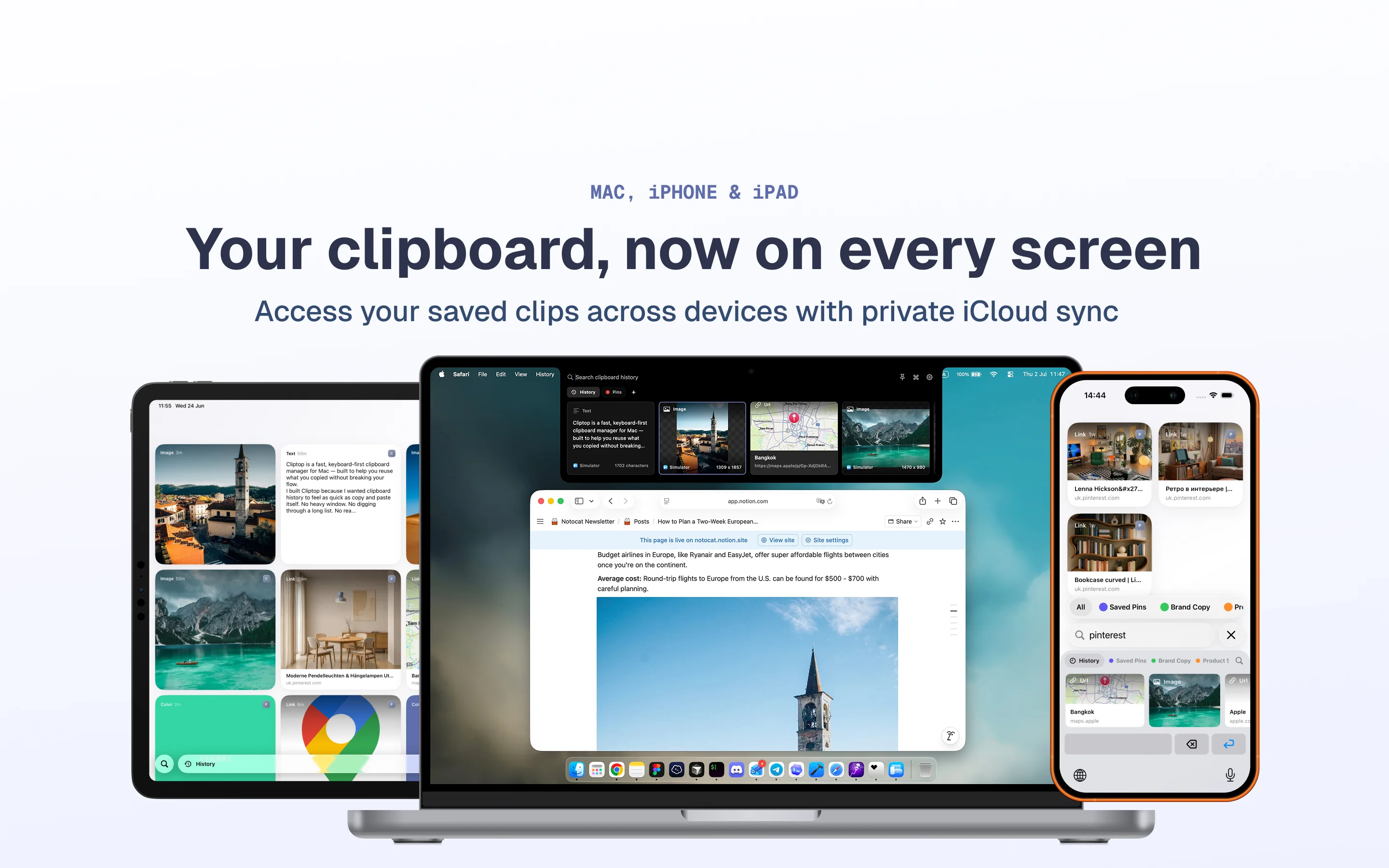
Cliptop for iOS is here with the first iPhone and iPad release, Cliptop iOS 1.0.0. You can now install Cliptop on your iPhone and iPad, keep your clips in sync, and enter your license in the iOS app to activate it.

Download Cliptop from the App Store

Cliptop running on iPhone and iPad

New features

  • Added on-device OCR for detecting text in images. Detected text is searchable, so image clips are easier to find later. OCR is on by default and can be disabled in Settings.
  • Sensitive clips can now be blurred. Automated checks blur sensitive card contents, and you can also manually mark clips as sensitive. You can adjust related options in Settings > Capture.

Product changes

  • Added a slight notch animation during delayed open.
  • Set the default notch open delay to 600ms.
  • Updated all windows with the Liquid Glass design.
  • Replaced the sensitive warning icon with blurred clip contents.
  • Improved the design of image and URL clips.

Bug fixes

  • Fixed an issue where the left arrow for going back to the start of history did not always take focus.
  • Made small fixes to the drag and drop UI.
Version 1.4.3macOS

Cliptop 1.4.3: Drag and drop files into the notch

This release makes the notch area more useful when you are moving files around, not just text snippets.

New feature

  • You can now drag files and images into the notch area. Drop them on Cliptop and choose whether to pin them to a board, add them to history, or AirDrop them to your other devices.

Settings

  • If drag and drop is not part of your workflow, you can turn it off in Settings > Shortcuts.
Version 1.4.2macOS

Cliptop 1.4.2: iCloud sync improvements and clipboard panel fixes

Mostly fixes in this one, along with iCloud sync improvements for the upcoming iOS app.

Product changes

  • Added a new rule that resets the cursor back to the start of history if the clipboard panel has not been opened for 3 minutes or more.

Bug fixes

  • Fixed iCloud sync issues.
  • Fixed an issue where deleting a pinned item from history would remove it from the pinboard as well.
  • Fixed issues with fetching link previews from some websites.
Version 1.4.1macOS

Cliptop 1.4.1: Multi-select and iCloud sync fixes

New features

  • Added Multi-select. Hold Shift, then click or use the arrow keys to select multiple clips at once. You can then paste, copy, or delete multiple clips in one action.

Product changes

  • Improved the design of the URL editor.
  • Added a Feedback/Review section in Settings > About.

Bug fixes

  • Fixed small issues with iCloud sync.
  • Fixed an issue where deleting a clip could corrupt it without removing it from history.
Version 1.4.0macOS

Cliptop 1.4.0: Private iCloud Sync, renamed clips, and rich text editing

New features

  • Added Private iCloud Sync. You can now opt in to sync clips and pinboards with your own private iCloud. This option is off by default. You can activate it from Settings > General.
  • Clips can now be renamed to make search easier. Right-click any clip and select Rename….
  • The text editor is now a Rich Text Editor, with more tools for making quick text edits.

Product changes

  • Improved the design of the image editor.
  • Double-click behavior can now be changed in Settings > Shortcuts. For example, you can assign clip double-click to open the Editor.

Bug fixes

  • Newly copied clips used to take a split second to appear in the panel. This is now fixed, and new clips appear almost instantly.
Version 1.3.0macOS

Cliptop 1.3.0: Design clips for Figma layers

New features

  • Introduced a new Design clip type. It currently works with Figma and can store layer information in your history. You can now store, pin, and reuse Figma layers with Cliptop. You can also search for layers that contain the text you are looking for.

Product changes

  • Added application icons in clip cards. Tip: type app:<app_name> in the search bar to show clips copied from a specific app.
  • Added a Quit button in the Settings window navigation.
  • Pressing Enter or double-clicking an item now shows a Copied toast when Accessibility permissions are not granted.

Bug fixes

  • Fixed a single-click delay in the clipboard panel. Clicks should feel instant now.
  • Fixed an issue where selecting Copy actions from the command palette did not close the clipboard window.
Version 1.2.0macOS

Cliptop 1.2.0: Pinboards and smart search autocomplete

New features

  • Added Pinboards to Cliptop. You can now pin clips into different boards to stay organized.

Press Cmd-P to pin items, then select the destination. You can also navigate between History and Pinboards using Cmd-Arrow keys.

Product updates

  • The search bar now has autocomplete for type:<clip_type> smart search.
  • Updated labels across the app to make things clearer.

Bug fixes

  • Fixed a blinking drag and drop indicator.
  • Fixed an issue with a lingering clip ghost after successfully dropping a clip to reorder the list.
Version 1.1.3macOS

Cliptop 1.1.3: Drag and drop reordering for history and pins

New features

  • Added drag and drop reordering for items in history and the pin board.
  • Added controls to remove all history and/or pins from Settings > Advanced.

Product changes

  • Pins are now saved in the pinboard until you delete them.

Bug fixes

  • Fixed an issue where copied items did not appear in the clipboard window if they were copied while the window was already open.
  • Fixed a memory leak when switching between History and Pins repeatedly.
Version 1.1.2macOS

Cliptop 1.1.2: Scrolling, hover states, and sensitive pasteboard handling

Product updates

  • Added support for using vertical scrolling input to move through the clipboard list.
  • Added a hover effect on clipboard items.
  • Made the Liquid Glass theme actually feel glassy.
  • Locked Translucent and Liquid Glass surfaces to a single theme treatment.
  • Some apps mark items as sensitive with org.nspasteboard.ConcealedType. Cliptop now ignores these items so they are not saved in history.

Bug fixes

  • Fixed the Solid surface in light theme.
  • Fixed URL previews and preview refresh.