
Cliptop and Maccy
A Maccy alternativethat goes beyond history.
Maccy is an excellent free, open-source history tool with pins, previews, OCR, and plain-text paste. Cliptop is for people who also want Semantic Search, Pinboards, snippets, Smart Actions, richer content tools, and private sync across Mac, iPhone, and iPad.
 Download Cliptop for Mac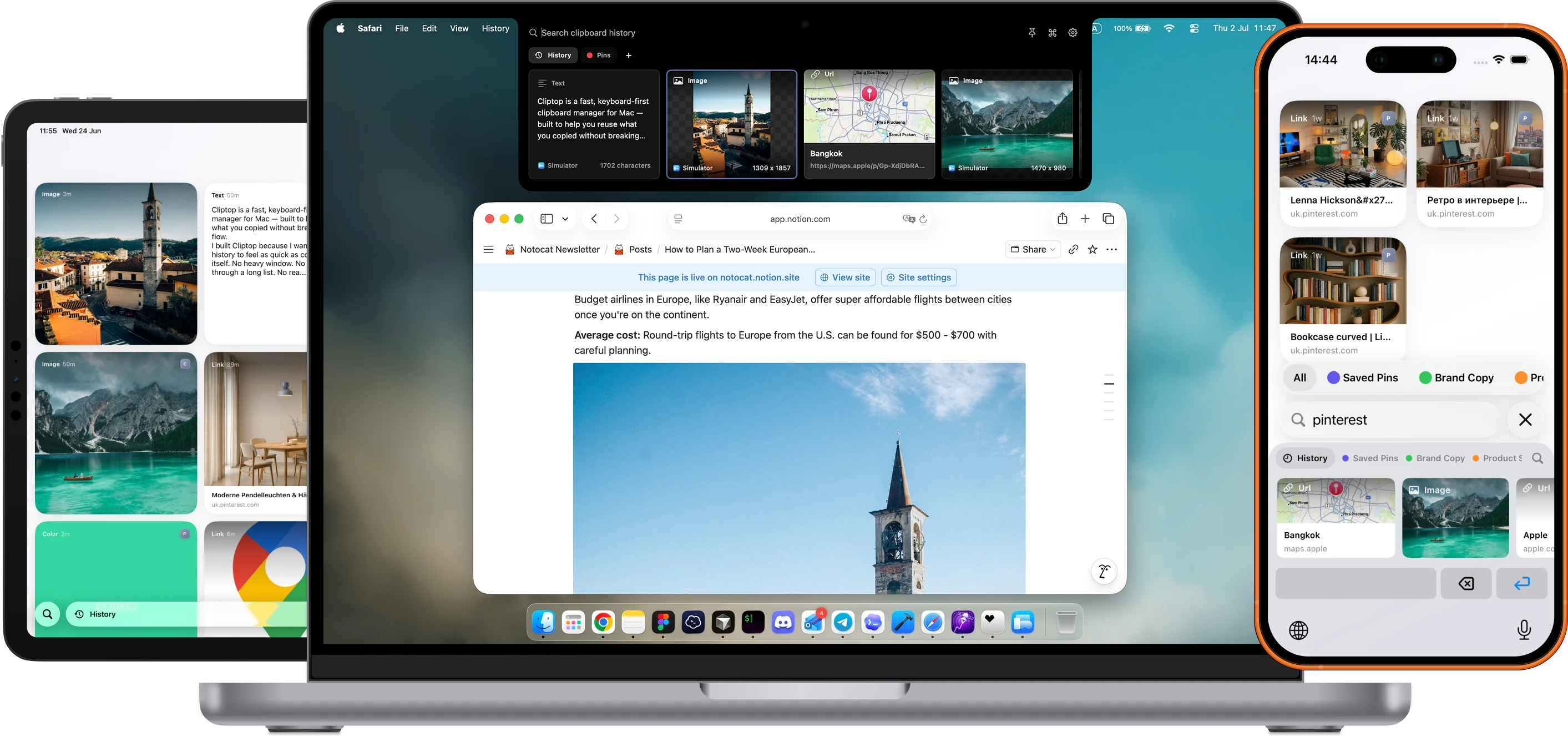
At a glance
Focused history or connected workflow?
Both apps search, preview, pin, and paste previous copies. The difference is scope: Maccy stays focused on fast Mac history, while Cliptop adds deeper organization, semantic retrieval, reusable snippets, cross-device access, and more actions after you find an item.
Best fit
- Maccy
- Fast, free, open-source clipboard history for one Mac.
- Cliptop
- A broader clipboard workflow with semantic search, Pinboards, snippets, and format-specific actions.
Search
- Maccy
- Fast keyword search, including recognized text inside images.
- Cliptop
- Keyword search, on-device OCR, and Semantic Search when you remember the idea instead of the exact words.
Organization
- Maccy
- Pin important items at the top of history.
- Cliptop
- Group clips into Pinboards, browse them in Library view, and save reusable text as snippets.
Actions
- Maccy
- Copy, paste, paste without formatting, preview content, and copy recognized image text.
- Cliptop
- Clean URLs, copy Markdown links, transform code, inspect colors, edit images, use Quick Look, and create Calendar events from copied details.
Devices
- Maccy
- Mac app with local history; no app-level history sync.
- Cliptop
- Apps for Mac, iPhone, and iPad with optional private iCloud Sync for clips and Pinboards.
Tradeoff
- Maccy
- Focused on fast history instead of cross-device organization and a larger action layer.
- Cliptop
- Not open source and more opinionated; no shared collaborative Pinboards.
Price
- Maccy
- Free from GitHub or Homebrew; $9.99 on the Mac App Store.
- Cliptop
- $0 trial, $9.99/year launch plan, or $19.99 lifetime launch plan.
Why people switch
When history becomes a working library.
The reason to switch is not that Maccy cannot recover or preview a copy. It is wanting more ways to rediscover, organize, reuse, and transform what you save.
Find clips by meaning
Use Semantic Search when you remember what a clip was about but not the exact words it contained.
Turn history into reusable tools
Organize Pinboards, browse the larger Library view, and expand snippets with template variables in any app.
Act on the content
Clean links, transform code, inspect colors, edit images, preview files, or create a Calendar event from copied details.
Which one should you use?
Pick by workflow.
Choose Maccy if
- You want something free and open source.
- You want a focused, keyboard-first Mac utility.
- Pins, previews, OCR search, and plain-text paste cover your workflow.
- You do not need app-level sync or a larger organization system.
Choose Cliptop if
- You want Semantic Search and OCR for a mixed clipboard history.
- You want Pinboards, Library view, and reusable snippets with variables.
- You want format-specific actions and Calendar Smart Actions.
- You want local-first Mac history with optional private iCloud Sync across Mac, iPhone, and iPad.
Questions
Before switching.
Is Cliptop better than Maccy?
It depends. Maccy is better if you want a free, open-source, keyboard-first history tool. Cliptop is better if you want semantic search, Pinboards, snippets, cross-device sync, and a broader set of content-aware actions.
Is Maccy still a good choice?
Yes. Maccy is a strong choice if you want lightweight, keyboard-first clipboard history with pins, previews, OCR search, and plain-text paste.
Can Cliptop replace Maccy?
For many Mac users, yes. Cliptop covers searchable history and adds Semantic Search, Pinboards, snippets, Library view, private iCloud Sync, and actions for text, links, colors, images, files, code, and Calendar events.
Does Cliptop keep clipboard history local?
Yes. Cliptop stores history locally by default. Optional iCloud Sync can sync clips and pinboards through your private iCloud database.
Does Cliptop work on iPhone and iPad?
Yes. Cliptop has apps for iPhone and iPad. Optional private iCloud Sync keeps clips and Pinboards available across your supported Apple devices.
Official details
Check current details.
Pricing and platform details can change. These pages were reviewed on 2026-07-31.
Cliptop for Mac, iPhone, and iPad
Keep your clipboard history close on every device.
Start with the Mac app, then keep clips and pinboards available on iPhone and iPad with optional private iCloud Sync.