
Best Clipboard Manager for Mac in 2026
An opinionated 2026 guide to the best clipboard managers for Mac: Maccy, Paste, Raycast, Cliptop, and Pastebot.
Last updated: July 31, 2026.
The best clipboard manager for Mac in 2026 is not one app for everyone. The right answer depends on what you mean by “clipboard manager”: a tiny history menu, a polished Apple-device library, a launcher command, a Mac-first paste workflow, or a power tool for filters and queued clippings.
Here is the short version:
| Category | Best pick | Why |
|---|---|---|
| Best free/focused | Maccy | Lightweight, open-source, keyboard-first history with pins, previews, OCR search, and plain-text paste. |
| Best collaborative Apple ecosystem library | Paste | Strong Mac, iPhone, and iPad clipboard library with search, shared Pinboards, private iCloud sync, and polished organization. |
| Best launcher-adjacent | Raycast | Best if clipboard history should live inside your launcher, alongside snippets, window management, extensions, and AI features. |
| Best connected action workflow | Cliptop | Best if you want local-first Mac history with Semantic Search, Pinboards, snippets, Smart Actions, richer content tools, and private sync across Mac, iPhone, and iPad. |
| Best advanced filters/Stacks | Pastebot | Best if filter chains, Smart Pastebins, sequential Stacks, Shortcuts, and CLI access matter most. |
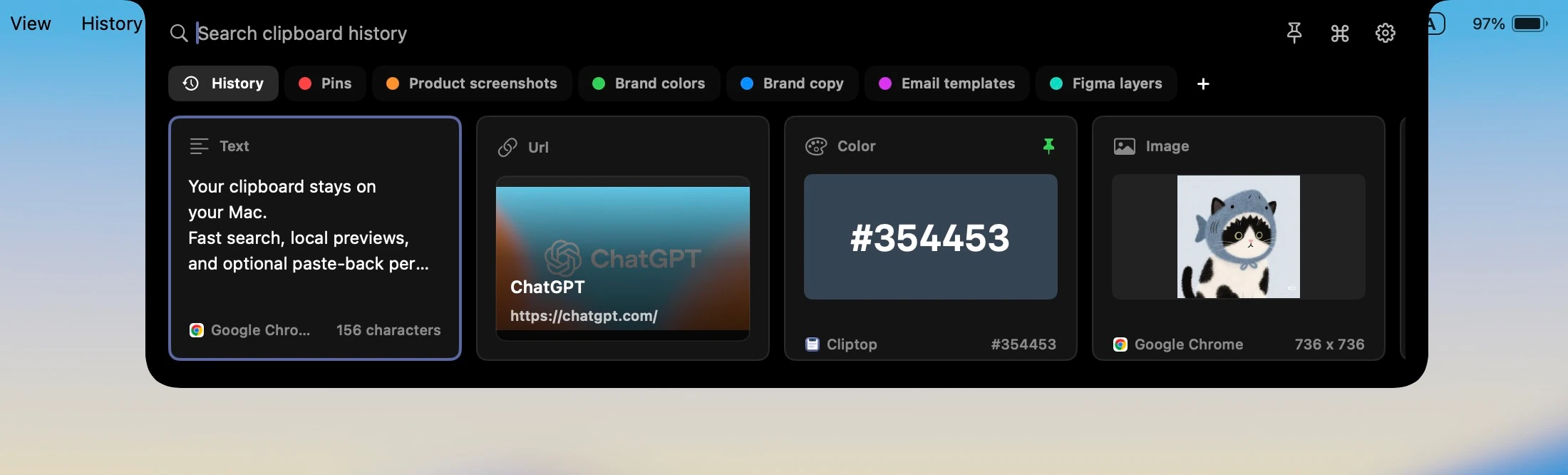
If you want focused, free, open-source history, install Maccy. If you want a polished collaborative library across Apple devices, try Paste. If you already live in Raycast, its Clipboard History is the obvious place to start. If you want a local-first clipboard command center with Semantic Search, reusable snippets, and content-aware actions, try Cliptop. If you want advanced text filters and sequential Stacks, Pastebot deserves a place in the conversation.
The point is to choose by workflow, not by the longest feature list. Maccy, Paste, Raycast, Cliptop, and Pastebot all solve clipboard history, but they are built for different kinds of Mac users.
Do You Still Need a Clipboard Manager on Mac in 2026?
Yes, many Mac users still need a dedicated clipboard manager in 2026, even though macOS now has native clipboard history. Apple’s Mac User Guide says you can search Clipboard history from Spotlight, use Command-4 to open it, copy an item from history, and clear history.
That built-in feature is good news. It also changes the bar for third-party apps. A clipboard manager for Mac now has to do more than say “we save old copies.” It has to open faster, search better, preview more clearly, keep sensitive data under control, and help you act on the item once you find it.
The native Spotlight history is best for occasional recovery. Dedicated clipboard managers are better when clipboard history is part of your daily workflow: writing, coding, support, research, design, sales replies, QA notes, terminal commands, file references, images, colors, and links.
How We Chose the Best Mac Clipboard Managers
The useful comparison is not “which app has the longest feature list?” The useful comparison is “which app fits the way you copy and paste?”
For this 2026 guide, the deciding criteria are:
- Speed of access: Can you open history from anywhere without breaking flow?
- Search and preview quality: Can you find text, links, images, files, code, and colors quickly?
- Paste workflow: Can you paste, paste as plain text, queue items, or run actions without extra cleanup?
- Privacy model: Is clipboard history local, synced, encrypted, ignored for sensitive apps, or configurable?
- Apple ecosystem fit: Does it work only on Mac, or across Mac, iPhone, and iPad?
- Clear use case: Does the app have a clear reason to exist beyond “clipboard history”?
That last point matters. In 2026, the best clipboard managers are not interchangeable. Maccy, Paste, Raycast, Cliptop, and Pastebot each win a different job.
Best Free and Minimal: Maccy
Maccy is the best free minimal clipboard manager for Mac. It is the right pick if you want one job done well: keep copy history nearby and let you access it fast.
Maccy’s own site describes it as lightweight, open source, keyboard-first, native, and stored on your computer. It is focused, but it is no longer just a bare text list: Maccy supports pinned items, image and text previews, OCR search, copying recognized text from images, color information, and paste without formatting.
Choose Maccy if:
- You want free, open-source software.
- You prefer a focused, keyboard-first menu-bar utility.
- You want pins, previews, OCR search, and plain-text paste without adding a larger clipboard system.
- You do not want a subscription.
- You do not need app-level sync, Pinboards, semantic retrieval, or snippet expansion.
The tradeoff is scope. Maccy gives you capable local history without trying to become a cross-device library or a reusable-content system. Choose another app if you want shared Pinboards, private app-level sync, Semantic Search, snippets with variables, Calendar actions, or a larger set of format-specific transformations.
Verdict: Maccy is the best free clipboard manager for Mac if focused, open-source history is the point.
Best Apple Ecosystem Library: Paste
Paste is the best clipboard manager for people who want an Apple ecosystem clipboard library. It is polished, visual, searchable, and built around Mac, iPhone, and iPad.
Paste offers organized searchable history, infinite clipboard history, pinboards, cross-device access, private iCloud, multiple paste options, custom rules, previews, editing, Siri Shortcuts, and an iOS keyboard. Its pricing page currently describes all-in-one access on Mac, iPhone, and iPad with subscription or lifetime purchase options.
This is where Paste is strongest: it treats clipboard history as a library. If you want copied items to be available across Apple devices and organized into a more visual system, Paste is one of the obvious apps to test.
Choose Paste if:
- You want a dedicated app on Mac, iPhone, and iPad.
- You like visual clipboard cards and pinboards.
- You want private iCloud sync across Apple devices.
- You save reusable clips, not just recent copies.
- You are comfortable paying for a premium clipboard library.
The tradeoff is that not every Mac user wants their clipboard to become a library. Some people need a lighter, closer-to-the-current-task workflow. Paste is excellent when organization and Apple-device reach are the point. It can feel like more product than you need if all you want is fast Mac search and paste actions.
Verdict: Paste is the best clipboard manager for Mac users who want a polished Apple-device clipboard library.
Best Launcher-Adjacent Clipboard Manager: Raycast
Raycast is the best launcher-adjacent clipboard manager for Mac. If you already use Raycast as your launcher, its Clipboard History is the first clipboard tool you should try.
Raycast’s Clipboard History manual says it tracks copied text, images, files, links, emails, and colors. It preserves original formats, groups content copied together, and supports plain-text paste, on-device OCR, QR extraction, editing, snippets, renaming, pins, sequential paste, and configurable retention. Ask Clipboard can also act on the latest copied item with natural language.
That makes Raycast more serious as a clipboard tool than people sometimes give it credit for. The catch is in the category: Raycast is a launcher first. Clipboard History is one of many commands inside a broader productivity layer.
Choose Raycast if:
- You already use Raycast every day.
- You want clipboard history inside the same command palette as apps, files, snippets, windows, extensions, and AI.
- You like assigning aliases and hotkeys to commands.
- You want a broad Mac productivity layer, not a clipboard-only utility.
The tradeoff is focus. A dedicated clipboard manager can optimize every interaction around copied items. Raycast optimizes for command-palette productivity. That is perfect for many power users, but it is not the same design target as Cliptop, Paste, Maccy, or Pastebot.
Verdict: Raycast is the best clipboard manager if you want clipboard history as part of a launcher.
Best Connected Action Workflow: Cliptop
Cliptop is the best clipboard manager for a connected action workflow. It combines a compact Mac panel with a larger Library view, helps you rediscover clips by exact text or meaning, and keeps the next action close to what you copied.
Cliptop keeps text, links, code, screenshots, images, files, and colors searchable on your Mac. On-device OCR makes text inside images searchable, while Semantic Search can find related clips even when your query does not repeat the original words. Open Cliptop from the notch, menu bar, or Shift-Cmd-V, then use the same shortcut again to move into the larger Library view.
History is local by default. Optional iCloud Sync uses your private iCloud database to keep clips and Pinboards available across Mac, iPhone, and iPad. Direct Paste can paste the selected item back into the app you were already using, while snippets expand reusable text—with template variables—directly inside any app.
Choose Cliptop if:
- You want local-first Mac history with optional private cross-device sync.
- You want fast access from the notch, menu bar, or keyboard.
- You want keyword search, on-device OCR, and Semantic Search by meaning.
- You want Pinboards, Library view, snippets, and template variables.
- You want clean URL, Markdown, code, color, image, Quick Look, and Calendar actions close to the selected item.
- You want apps for Mac, iPhone, and iPad without a Cliptop cloud clipboard account.
Choose Paste instead if shared collaborative Pinboards are central to your workflow. Choose Raycast if you want clipboard history inside a broad launcher, and choose Maccy if open source is non-negotiable. Choose Cliptop when you want the Mac clipboard to stay close to the current task while still giving saved clips a larger, connected home.
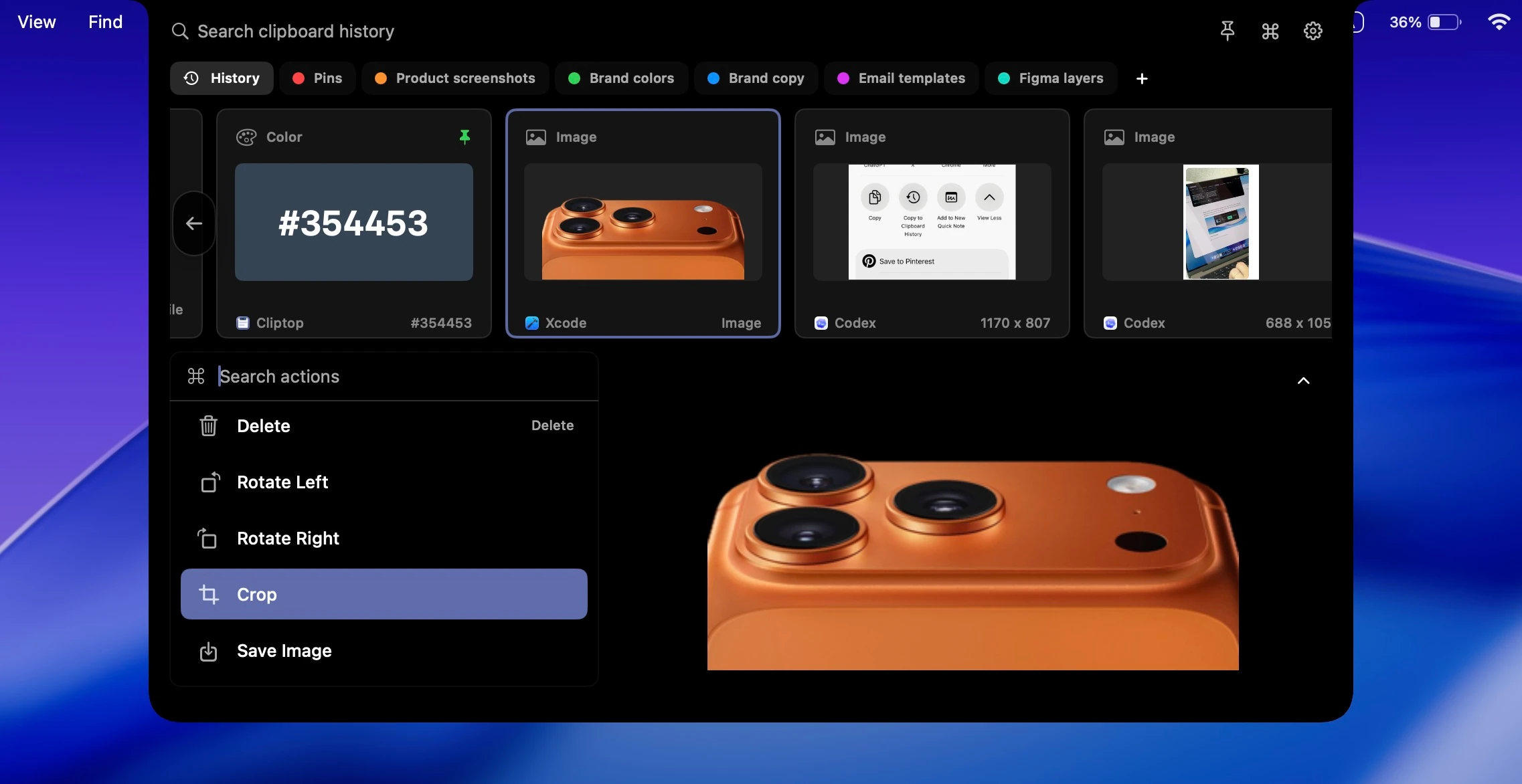
For example, a copied URL can become a clean link or Markdown link. A copied paragraph can be pasted without formatting. A screenshot can become searchable through OCR. Event details can become a Calendar suggestion. A reusable reply can become a snippet with variables. A file or image can open in Quick Look before you paste it.
Verdict: Cliptop is the best clipboard manager for people who want local-first Mac history, deeper retrieval, reusable content, and actions that match what they copied.
Best Advanced Filters and Stacks: Pastebot
Pastebot 3 is the best clipboard manager for advanced filters and sequential Stacks. It is the pick for people who care deeply about transforming text before paste, organizing rule-based collections, and pasting multiple clippings in sequence.
Pastebot offers stackable filters with live previews, Custom and Smart Pastebins, searchable notes and metadata, a Quick Paste menu, sequential Stacks, app blacklists, and iCloud Sync between Macs. It also supports Apple Shortcuts and a command-line tool. Pastebot 3 requires macOS Tahoe or later.
Choose Pastebot if:
- You want to apply text filters before pasting.
- You want to collect multiple clippings into a Stack and paste them in sequence.
- You want Custom or Smart Pastebins with rules, metadata, and notes.
- You want Shortcuts or CLI access to clipboard data.
- You use multiple Macs and do not need dedicated iPhone and iPad apps.
The tradeoff is that Pastebot is specialized and currently requires macOS Tahoe. Its iCloud story is Mac-to-Mac, while Paste and Cliptop provide dedicated iPhone and iPad apps. If filter chains, Smart Pastebins, and sequential Stacks are the job, Pastebot is unusually strong.
Verdict: Pastebot is the best clipboard manager for advanced filters, rule-based Pastebins, and sequential Stacks.
Feature Comparison: Maccy vs Paste vs Raycast vs Cliptop vs Pastebot
| App | Best for | Strength | Good to know |
|---|---|---|---|
| Maccy | Focused open-source Mac history | Fast local search, pins, previews, OCR, plain-text paste | No app-level sync, Pinboards, Semantic Search, or snippet expansion |
| Paste | Collaborative Apple-device library | Mac, iPhone, iPad, shared Pinboards, private iCloud, visual organization | More library-like than some personal Mac workflows need |
| Raycast | Launcher-adjacent clipboard history | Rich clipboard actions inside a broader command palette | Best fit when you already want the larger Raycast platform |
| Cliptop | Connected action workflow | Local-first history, Semantic Search, Pinboards, snippets, Smart Actions, private cross-device sync | No shared collaborative Pinboards; not open source |
| Pastebot | Advanced filters and sequential Stacks | Filter chains, Smart Pastebins, Stacks, Shortcuts, CLI | Requires macOS Tahoe; iCloud sync is between Macs |
Which Clipboard Manager Should You Choose?
Choose Maccy if you want focused, free, local, open-source clipboard history with pins, previews, OCR search, and plain-text paste.
Choose Paste if you want a clipboard library across Apple devices. It is the best pick when Mac, iPhone, iPad, pinboards, and private iCloud sync matter more than staying small.
Choose Raycast if you already use Raycast as your Mac launcher. Its Clipboard History is strong enough that you should test it before adding another utility.
Choose Cliptop if you want local-first Mac history with Semantic Search, Pinboards, Library view, snippets, template variables, Smart Actions, and optional private iCloud Sync across Mac, iPhone, and iPad.
Choose Pastebot if filters, rule-based Pastebins, and sequential Stacks are the job. It is the power-user pick for text transformation, Shortcuts, and CLI workflows.
The shortest answer: if you want free and focused, use Maccy. If you want a collaborative Apple-device library, use Paste. If you want clipboard inside your launcher, use Raycast. If you want a local-first clipboard command center with private cross-device sync, try Cliptop. If you want filters and sequential Stacks, use Pastebot.
Where Cliptop Is the Better Pick
Most clipboard manager roundups talk about history as if the job ends when you find the old item. In real Mac work, that is usually only half the job.
You remember a copied paragraph but not its exact wording. You found the right URL, but it has tracking parameters. A screenshot contains text you need to search. Event details should become a Calendar entry. A reusable reply needs a short trigger and a customer-name variable.
That is the gap Cliptop is built for. It does not try to be the broadest launcher or a team knowledge base. It makes copied work easier to rediscover, organize, reuse, and act on without leaving the workflow already on your screen.
Download Cliptop for Mac if your clipboard problems are not just “where did that copy go?” but “how do I get it back into this workflow cleanly?”
Getting Started with Cliptop
If Cliptop sounds like the Mac-first clipboard manager you want, start with the Mac app. You do not need to change how you copy. The setup is mostly about giving your clipboard history one reliable place to appear, then learning the two or three actions you will use every day.
- Download Cliptop for Mac: Install it from the direct download or the Mac App Store. The Mac app includes a 7-day full-feature trial with no payment required, and launch pricing is listed on the Cliptop pricing section.
- Copy as you normally would: Cliptop saves text, links, code, screenshots, images, files, and colors. On-device OCR makes text inside images searchable.
- Open Cliptop from where you work: Use the notch, menu bar, or Shift-Cmd-V. Search by exact text or meaning, and use the shortcut again when you want the larger Library view.
- Paste or run the right action: Press Enter to paste, Shift-Enter for plain text, Cmd-K for actions, Cmd-P to pin, or Cmd-Y to open Quick Look for a file or image.
- Create reusable snippets: Give frequently typed text a short trigger, then add template variables when details such as a name or date change each time.
- Enable Direct Paste when you want one-step paste-back: Direct Paste uses macOS Accessibility permission so Cliptop can place the selected item back into the app you were using. If you prefer not to grant it, Cliptop can still restore the item to the clipboard for manual paste. The Direct Paste guide walks through the setting.
- Choose your privacy and sync setup: Clipboard history is local by default. Optional iCloud Sync uses your private iCloud database and keeps clips and Pinboards available across Mac, iPhone, and iPad. For the privacy details, read Is Your Clipboard Manager Private?.
For the fastest daily workflow, start with four shortcuts: Shift-Cmd-V to open Cliptop, Enter to paste, Shift-Enter to paste without formatting, and Cmd-K to run actions. The full list is in the Cliptop keyboard shortcuts guide.
Frequently Asked Questions
What is the best clipboard manager for Mac in 2026?
The best clipboard manager for Mac in 2026 depends on the workflow. Maccy is best for focused open-source history, Paste is best for collaborative Apple-device libraries, Raycast is best for launcher users, Cliptop is best for connected actions and reusable content, and Pastebot is best for filters and sequential Stacks.
Is Maccy better than Paste?
Maccy is better if you want a free, open-source, minimal clipboard history app for one Mac. Paste is better if you want a polished clipboard library across Mac, iPhone, and iPad with pinboards, search, and private iCloud sync.
Is Raycast a good clipboard manager?
Raycast is a good clipboard manager if you already use Raycast as your Mac launcher. Its Clipboard History supports text, images, files, links, emails, and colors, but it is part of a broader launcher rather than a dedicated clipboard-first app.
Who should choose Cliptop?
Choose Cliptop if you want local-first Mac history with Semantic Search, on-device OCR, Pinboards, Library view, snippets with template variables, content-aware actions, and optional private iCloud Sync across Mac, iPhone, and iPad.
Does macOS have built-in clipboard history?
Yes, macOS Tahoe includes Clipboard history in Spotlight. It is useful for occasional recovery, but dedicated clipboard managers are still better for daily search, previews, pinning, paste actions, filters, and cross-device libraries.
References
These pages were reviewed on July 31, 2026: Apple Spotlight Clipboard history, Maccy, Maccy documentation, Maccy on the Mac App Store, Paste, Paste pricing, Raycast Clipboard History, Raycast pricing, and Pastebot. For Cliptop details, see the Cliptop clipboard manager page, changelog, privacy guide, keyboard shortcuts guide, and Direct Paste guide.
 Download Cliptop for Mac