
Recover
Bring back copied items without retracing your steps.
Search recent copies by content, type, app context, or visual preview instead of reopening browser tabs, notes, design files, and editors.
 Cliptop
 Clipboard manager for Mac
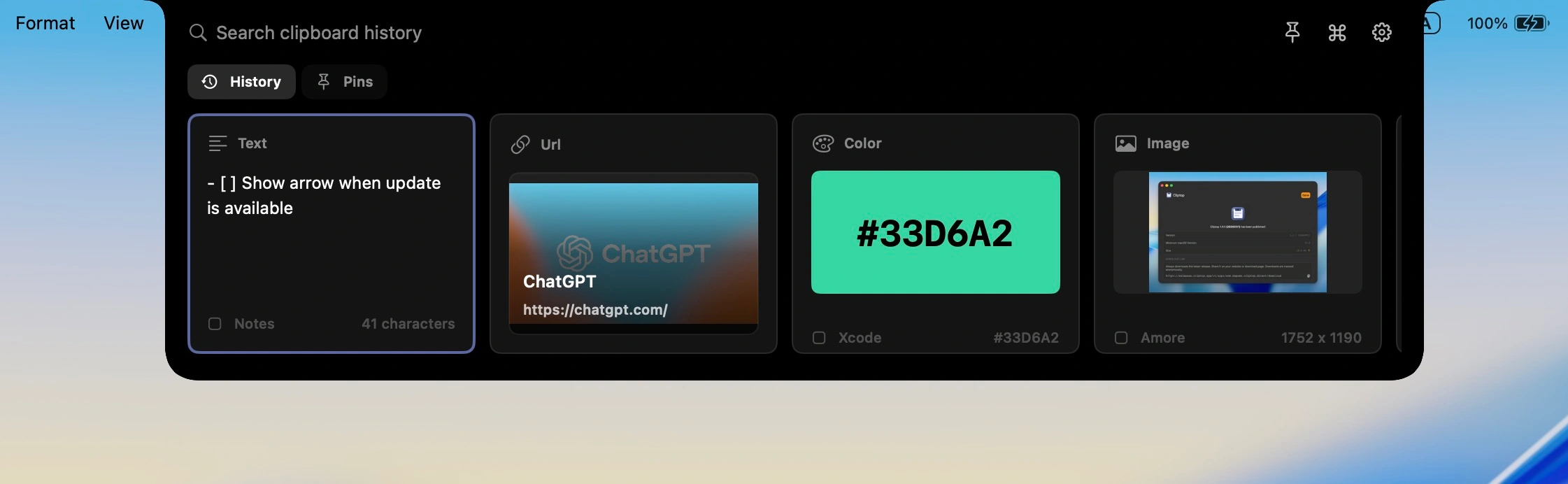
Cliptop keeps recent text, links, code, screenshots, images, files, and colors searchable on your Mac, then gives you the right paste action without making clipboard history a separate workspace.
Why it matters
Most clipboard problems are small but constant: a link with tracking junk, a sentence with wrong formatting, a snippet you copied before opening Slack, or a screenshot you need again after another copy replaced it.
Recover
Search recent copies by content, type, app context, or visual preview instead of reopening browser tabs, notes, design files, and editors.
Clean up
Paste plain text, clean URLs, copy links as Markdown, trim snippets, and use format-specific actions from the same place.
Stay fast
Cliptop opens where your attention already is. Search is focused immediately, so the next action is usually a few keystrokes away.
Stay local
Clipboard history can include private links, passwords, customer notes, screenshots, and files. Cliptop keeps that history local by design.
Workflow
Cliptop is designed around the loop Mac users repeat all day, not a library you need to manage.
Use the notch, menu bar, or Shift + Cmd + V. Search is ready as soon as Cliptop appears.
Look through recent text, links, code, screenshots, files, images, and colors with clear previews.
Paste directly, paste plain text, clean a link, copy Markdown, inspect a color, or restore the item for manual paste.
Private by design
Clipboard history is high-context by nature. Cliptop keeps the product useful while staying plain about where data lives and what permissions do.
Cliptop does not sync your clipboard history to a Cliptop cloud.
Accessibility permission enables one-step paste-back. Without it, Cliptop still restores items to the clipboard for manual paste.
Install the app and test the workflow before choosing yearly or lifetime Pro.
Pricing
Start with the Mac app. Try every Pro feature, then choose yearly or lifetime access when you are ready.
Trial
Try every Cliptop Pro feature from the Mac app.
3-day trial
Yearly
Full Cliptop Pro access for one year.
per year
Lifetime
Most popularPay once and keep Cliptop Pro.
one-time purchase
Already bought Cliptop? Recover your license key.
Questions
Cliptop combines searchable history with quick actions. You can recover copied items, paste as plain text, clean links, copy Markdown, inspect colors, and paste back into the app you were already using.
Yes. Cliptop works on any Mac. On non-notch Macs and external displays, open it from the menu bar or with Shift + Cmd + V.
No. Cliptop stores clipboard history locally on your Mac. It is built for fast daily use without routing your clipboard history through a Cliptop cloud.
Yes. The Mac app includes a 3-day full-feature trial with no payment required, plus a 30-day money-back guarantee if you buy Pro and decide it is not a fit.
Cliptop for Mac
Download the app, try every Pro feature, and decide after it has been in your workflow.