
Mac clipboard manager comparison
Maccy vs Paste vs Cliptop
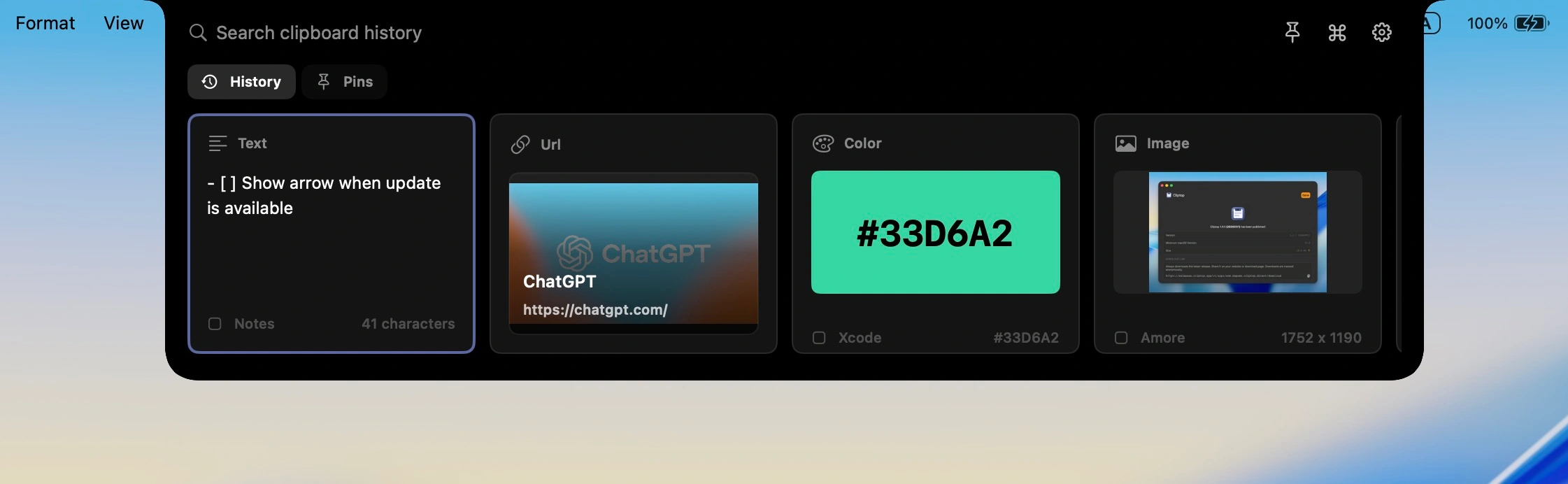
Maccy, Paste, and Cliptop all solve Mac clipboard history, but they optimize for different people. Maccy is the minimal open-source option. Paste is the polished cross-device clipboard library. Cliptop is the Mac-first clipboard command center for local history, Universal Clipboard capture, and quick actions.
Best Cliptop fit
You copy across apps all day and want the next action close.
If the job is just "show me old clipboard items," Maccy may be enough. If the job is "find it and fix or paste it now," Cliptop is the clearer match.
Minimal history
Maccy
Free, open-source clipboard history with a simple keyboard-first workflow.
Cross-device library
Paste
A polished clipboard library for people who want Mac, iPhone, and iPad apps.
Mac-first actions
Cliptop
Local Mac history with notch/menu-bar access, Universal Clipboard capture, and quick actions.
Where Cliptop pulls ahead
Built for the moment after you find the copy.
Open it where your eyes already are
Use the notch, menu bar, or Shift + Cmd + V instead of managing another clipboard window.
Act on the item you found
Paste plain text, clean URLs, copy Markdown, inspect colors, and paste back from the same place.
Keep history on your Mac
No Cliptop cloud clipboard account. iPhone copies can still land in history through Universal Clipboard.
At a glance
Different tools for different clipboard jobs.
If you are deciding between them, look past the basic "clipboard history" label. The daily difference is how fast you open the tool, where your copied items live, and whether you can act on an item once you find it.
Core job
- Maccy
- Fast clipboard history
- Paste
- Cross-device clipboard library
- Cliptop
- Clipboard history plus quick actions
Access model
- Maccy
- Menu bar and shortcut
- Paste
- Shortcut and visual clipboard history
- Cliptop
- Notch or menu-bar area, plus Shift + Cmd + V
Storage model
- Maccy
- Local on Mac
- Paste
- Device storage with private iCloud sync
- Cliptop
- Local history on Mac
Cross-device behavior
- Maccy
- No built-in app-level sync
- Paste
- Dedicated Mac, iPhone, and iPad apps with iCloud sync
- Cliptop
- No Cliptop iPhone app or cloud sync; can save Universal Clipboard items once they reach the Mac clipboard
Open source
- Maccy
- Yes
- Paste
- No
- Cliptop
- No
Pricing
- Maccy
- Free via GitHub/Homebrew; $9.99 on the Mac App Store
- Paste
- $29.99/year personal plan; lifetime option at $89.99
- Cliptop
- $0 trial, $9.99/year launch plan, $19.99 lifetime launch plan
Best fit
- Maccy
- Minimal, free, keyboard-first clipboard history
- Paste
- Apple-device sync, pinboards, and organized clip libraries
- Cliptop
- Mac-first users who want local history, actions, and a memorable access point
Tradeoff
- Maccy
- Fewer built-in cleanup and paste actions
- Paste
- Sync and collaboration may be more than some users need
- Cliptop
- Mac-first by design; no dedicated mobile app, shared boards, or open-source code
Which should you choose?
Start with the workflow, not the feature count.
These tools overlap enough that a yes/no checklist gets misleading. The clearer question is what you need clipboard history to be in your day.
Simple
Choose Maccy if
- You want free and open-source software.
- You mainly copy text and links.
- You prefer a minimal menu-bar utility.
- You do not need a richer paste-action layer.
Ecosystem
Choose Paste if
- You want a dedicated clipboard app on Mac, iPhone, and iPad.
- You use pinboards or shared boards.
- You want a mature premium clipboard library.
- You are comfortable paying for cross-device organization.
Mac flow
Choose Cliptop if
- You want clipboard history near the notch, menu bar, or shortcut.
- You want paste actions for text, links, colors, images, files, and code.
- You prefer local clipboard history with no Cliptop cloud account.
- You use Universal Clipboard and want iPhone copies searchable later on your Mac.
Detailed comparison
Where the differences actually matter.
History and search
The difference is not whether they remember copies. It is what happens next.
Maccy is intentionally minimal: open history, type, select, and move on. Paste expands that idea into an organized clipboard library across Apple devices. Cliptop sits closer to the current Mac task: open near the top of the screen, find the item, then paste or run the action that matches the selected content.
Privacy and devices
Cliptop is local-first, but that does not mean iPhone copies are ignored.
Paste is stronger when you want a dedicated clipboard app on multiple Apple devices. Cliptop does not offer a mobile app or Cliptop-managed cloud sync, but it can still save items that arrive on the Mac clipboard through Apple's Universal Clipboard. The distinction matters: Universal Clipboard capture is useful, but it is not the same as a mobile clipboard history browser.
Actions
Cliptop competes on the step between copying and pasting.
A comparison table can make every clipboard manager look similar. The practical difference is the action layer: paste plain text, clean a link, copy Markdown, inspect a color, preview a file, or paste back without turning clipboard history into a second workspace.
Cost and fit
Pay for the workflow you actually need.
Some people want the lowest-cost history tool. Others want a cross-device clipboard library. Cliptop is priced for Mac users who want a focused daily utility with local history and paste actions.
Maccy
The strongest value if you want a free, open-source clipboard history app and do not need built-in paste actions.
Paste
The stronger fit if you are paying for a polished clipboard library across Mac, iPhone, and iPad.
Cliptop
Start with a 3-day full-feature trial. If the workflow fits, choose $9.99/year or $19.99 lifetime launch pricing, backed by a 30-day money-back guarantee.
Questions
Common questions before switching.
Is Maccy better than Paste?
Maccy is better if you want a free, open-source, minimal clipboard history app. Paste is better if you want a polished clipboard library with dedicated Mac, iPhone, and iPad apps, pinboards, and app-level sync.
Is Cliptop a Maccy alternative?
Yes, if you want Mac clipboard history with a more opinionated workflow: notch or menu-bar access, local storage, and quick actions for copied text, links, colors, images, files, and code. Maccy remains a strong fit if you mainly want simple free history.
Does Cliptop work with Universal Clipboard from iPhone?
Yes. Cliptop does not have an iPhone app, but when Apple Universal Clipboard makes an iPhone copy available on your Mac clipboard, Cliptop can save that item into your Mac clipboard history.
Does Cliptop sync clipboard history to the cloud?
No. Cliptop keeps clipboard history local on your Mac and does not require a Cliptop cloud account for history.
Who should not choose Cliptop yet?
Do not choose Cliptop if you need a dedicated iPhone or iPad clipboard history app, shared pinboards, open-source software, or a broad launcher automation platform like Raycast or Alfred.
Checked against official pages
Verify the details before you switch.
Pricing, platform support, and sync behavior can change. These official pages were reviewed on 2026-06-09, so you can check the current details directly.
Cliptop for Mac
Try the Mac-first clipboard workflow.
Download Cliptop, test the notch or shortcut flow, and see whether local history plus actions fits the way you copy and paste.